Post only where you know you'll get approved.
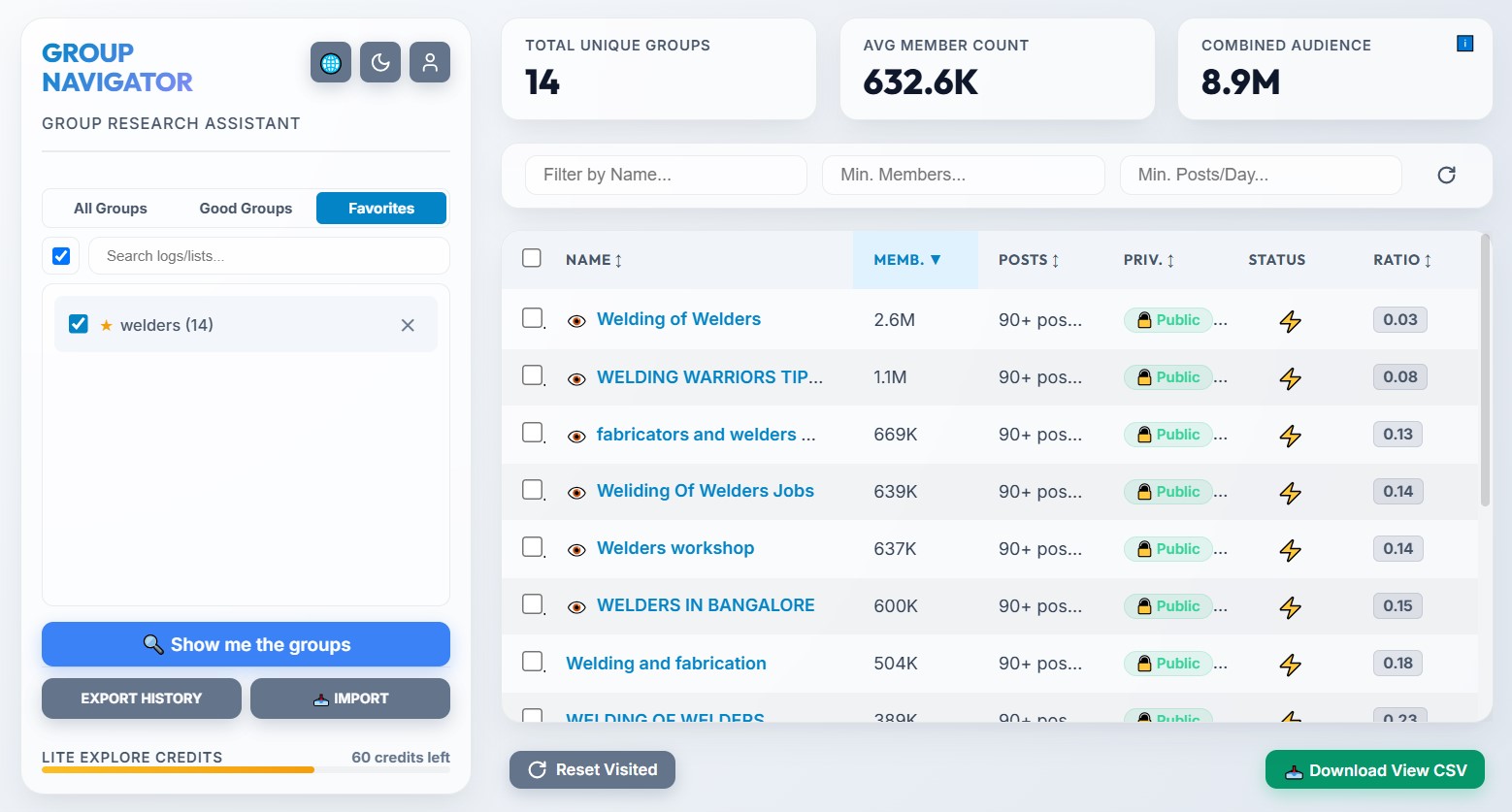
Group Navigator helps you find groups, post more efficiently, and stop wasting time posting in groups that don't approve your ads.
You can automatically gather in the dashboard all key details of groups from your searches, sort them by
member count, posts per day, and filter them by various criteria.
You will also be able to tag groups as "Instant Approval ⚡", "Late Approval ✅" or "Bad Group ❌" and build a
favorite groups list to access anytime, straight from the dashboard.
This way, you ensure you will always post in groups that accept your posts instantly.
Over time, you will have your own digital asset and a clean workspace, from which you can run daily campaigns knowing every post will get visibility the moment you hit "Post".
Build your favorite group lists following these simple steps.
Install Group Navigator from the Chrome Web Store
Search groups based on your field of interest.
(e.g. "jobs in Netherlands")
Click the extension and hit the button to centralize data
Identify the largest groups in your niche with certainty for maximum visibility
Open groups directly from the table and publish your ad
Right click on a group to save it as "Instant Approval ⚡" or "Late Approval ✅"
Tag with ❌ groups that constantly reject your posts
Next time, only post in groups you are sure will approve your post
This video is meant to show in a simple way
how the Group Navigator extension works.
If you understand what's happening
and like what you see,
install Group Navigator
and
give it a try.
For testing and small research
For recruiters and marketers
For active recruiters and lead generation
Technically, yes.
But the biggest vulnerability remains the operator's behavior.
Group Navigator is not a bot and does not post automatically for you. This tool was designed by a
recruiter for internal use and used in his recruiting activity, so safety was a priority during
development.
However, the main vulnerability remains the operator's behavior. If they abuse the extension and try to
collect thousands of groups or post a very large number of ads in a very short time, there is a risk of
getting temporarily blocked or limited from posting.
That's why it is recommended that the operator keeps as human a behavior as possible when using the
extension.
For example, if you post the same message in 30 groups, in 5 minutes, from a newly created account, you
will most likely be blocked because the algorithm considers this behavior as spam.
So if you keep a normal/human behavior, the algorithm will not consider you a bot.
It's all about maintaining a balance between the amount of data
processed and the time in which it is processed.
We do not encourage spam. Group Navigator is not an auto-posting bot (which leads quickly to a temporary or permanent Facebook account ban). Group Navigator helps you build lists of groups you know beforehand will approve your posts. It is a smart assistant that helps you post only in the groups that matter.
No. No software can turn a weak offer into a successful one. What Group Navigator does is help you create lists of groups that approve your posts. It helps you not waste your daily posting limit on groups that keep you waiting. If your offer is good, Group Navigator helps you post it in groups where you know from experience your ads will be published.
Each license key is tied to a single device fingerprint to prevent key sharing. If you change your computer or workstation, you can easily use the "Reset Device" button in the extension settings to associate it with your new machine.
From day one, the extension saves you time when searching for groups to post your offer. But after some time of testing, verifying, and tagging groups, you will have a private list with dozens of tagged groups (e.g., Instant Approval, Rejected). Instead of posting randomly, you will open your favorite groups list directly and post with the certainty that every ad will be approved. You are practically building a digital asset that makes your daily work more efficient.
Your free credits (15 explorations and 6 CSV downloads) reset automatically at the beginning of each calendar month. The moment you open the extension in a new month, the counter resets to 0. No manual action is required.
Explorations: An exploration is consumed when you press the extension button to extract
and analyze groups from a Facebook results page.
Tags: A tag is consumed only when
you save a new group to the database with the "Instant" or "Late Approval" status. Cleaning up is free: if
you mark a group as "Bad Group ❌" to remove it, this action is 100% free and does not deduct from your
limit!
Message me on WhatsApp for any curiosity or question about the extension and I will gladly reply as soon as possible.
Contact me on WhatsApp